Labor Assignments
Work-Package-bound labor planning with live validation, immediate time-phased costing, and controlled status-date alignment.
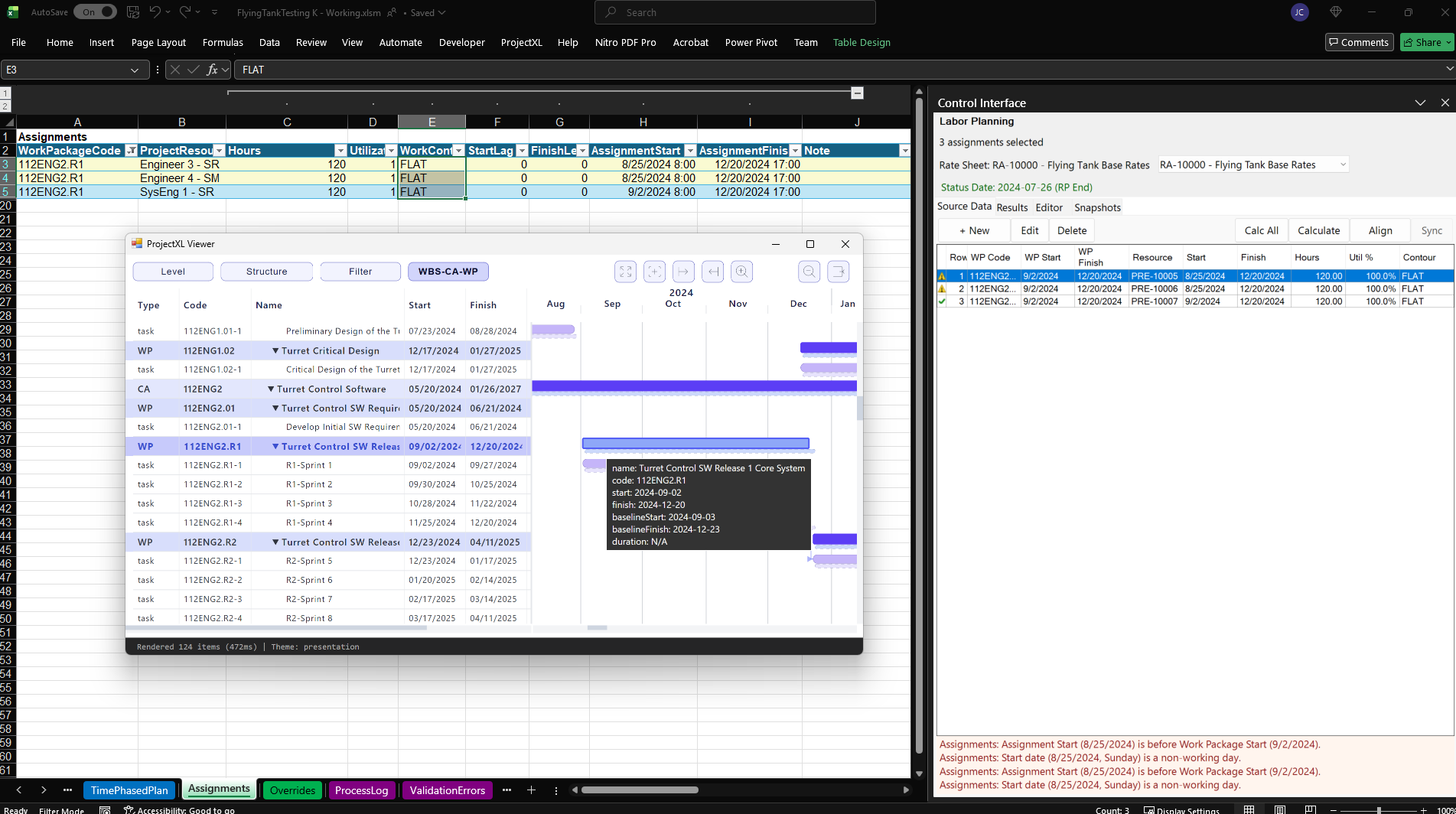
Labor Planning turns the Assignments table into a governed execution-planning surface rather than a passive spreadsheet. Each assignment remains anchored to a Work Package, inherits the surrounding project structure, and can be reviewed in the same moment that the user evaluates dates, resource identity, utilization, contour, and cost behavior.
The result is a planning workflow that stays inside the authoritative model. Users are not exporting rows to a side tool, estimating labor in a disconnected sheet, and then trying to reconcile the answer later. They are working directly on the execution definition that downstream analysis will consume.
Work Package Anchored Assignments
The Djobu capability model makes the Work Package the integration boundary for planning, cost, schedule, and external alignment. Labor Planning applies that rule directly. Every assignment row references a Work Package, and the planner can see whether the assignment dates and effort assumptions still make sense for that governing container.
In the screenshot, the selected assignments all belong to the same Work Package release window. That matters because the system is not just collecting labor lines. It is checking whether planned effort actually fits the structural and timing boundaries of the work it claims to support.
Live Validation Before Calculation
The right-side control is designed to answer the planner's first question quickly: is this scope valid enough to trust? As the selected assignment scope loads, the interface surfaces row status, shows the active rate sheet and status date, and lists validation problems at the bottom of the pane.
That behavior reflects the Labor Planning specification directly:
- the selected Assignments rows become the active planning scope
- validation runs before the user commits to calculation
- error feedback stays tied to the exact rows and fields causing the problem
- warnings and errors remain visible without forcing the user into a separate diagnostic workflow
In this example, the system highlights a meaningful planning problem instead of hiding it: one assignment starts before the Work Package start date, and the start date also falls on a non-working day. That is the kind of issue that would quietly degrade forecast credibility in a less-governed planning tool.
Immediate Time-Phased Costing
Once the scope passes validation, the planner can calculate directly from the control interface. The feature is built for rapid what-if work: select assignments, calculate, inspect the spread, adjust, and calculate again. The planner does not need to wait for a full-project batch process just to understand the effect of a few staffing changes.
This is especially important for Basis of Estimate refinement. Labor Planning lets teams test whether the staffing pattern they intend to use is realistic for the available window, the assigned resource, and the selected contour. Hours and utilization are not abstract inputs here. They become time-phased analytical results that feed the shared plan surface used downstream.
Coordinated Planning Without Duplicate State
The screenshot also shows a synchronized structural view of the same Work Package in the ProjectXL Viewer. That coordination is valuable because it lets the planner inspect assignment timing against the broader Work Package and task context. The platform doctrine is explicit on the boundary, though: coordinated selection improves navigation, but it must not create a second planning representation.
That is the strength of this design. The planner can move between the assignments table, the planning control, and the schedule-facing view while staying inside one authoritative planning focus.
Status-Date Alignment That Preserves Intent
The Align action exists for a real planning problem: the status date advances, but the labor plan still reflects an earlier forecast boundary. Instead of forcing manual rework across multiple assignment rows, the planner can align the remaining labor plan to the new status boundary in a controlled step.
According to the feature spec, that alignment preserves user-defined total hours while moving dates forward and slicing the remaining contour shape appropriately. In practice, that means planners can keep forecast intent intact while bringing the assignment set back into temporal alignment with the project's current reporting boundary.
Why This Section Matters
This page represents more than labor entry. It shows how Djobu treats execution planning as governed model development. Assignment rows are useful because they remain structurally anchored, validation is immediate, calculations are deterministic, and downstream analytical outputs come from the same planning state the user just reviewed.
That is the broader pattern running through the product: bring hard project-controls decisions into working software without flattening the logic that makes those decisions trustworthy.