Why Project Online's End of Life Might be the Best Thing That Ever Happened to Us
Project Online’s end of life forced us to look for a credible replacement, but in the process we ended up building something much better: a true desktop project control system designed to go far beyond scheduling.
When we realized Project Online was going away, our first reaction was not excitement. It was the same reaction many other teams had: this was going to force a decision we had hoped we would not have to make yet.
We were in the same boat as everyone else. We depended on the scheduling capability, knew the surrounding limitations all too well, and did not love the idea of scrambling toward a replacement just because Microsoft had finally put a date on the end of the road. So we made a reluctant decision: we would see whether we could build something better ourselves.
The only reason that felt remotely plausible was our growing experience with AI tools in the first half of 2025. Our team has spent roughly 30 years in software engineering, project management, and project controls, so we already knew what we wished a system could do. What changed was our ability to turn that experience into a real product.
As we worked more with AI, the range of what was possible opened up quickly. The models were increasingly good at identifying suitable technologies for specific problems and helping us build production code with languages, frameworks, and libraries we had never used before. After a slower start in the winter of 2025-2026, we found a rhythm with the tool stack. That is a big part of why ProjectXL became far more than a replacement scheduler with somewhat better cost planning bolted on.
That background matters because this article is not just making a market argument. It is making a practical one. We did not start by trying to build our dream platform. We started with one pressing problem: we needed a legitimate replacement for Microsoft Project and Project Online, and nothing on the market quite fit the bill of an inexpensive critical path tool with at least a rudimentary path toward cost planning.
Once we solved that first problem, the obvious next question was: if we can solve this, what else should a modern project-controls tool finally do right?
First We Had to Replace Project for Real
The first requirement was not theoretical. We needed a real scheduler. That meant legitimate critical path capability, a credible scheduling engine, and enough planning structure that the result would not just be a toy built to prove a point.
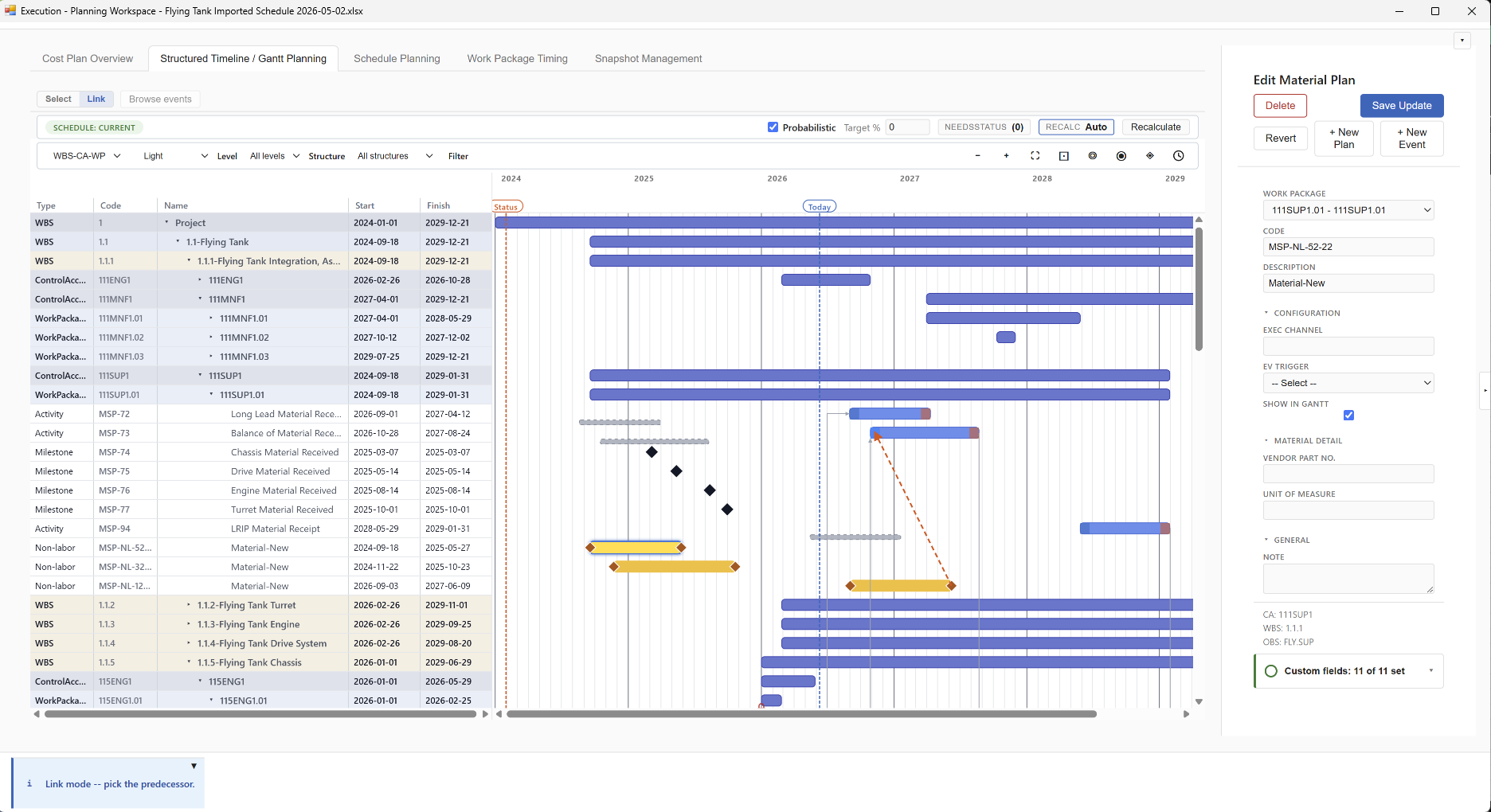
We built a pilot schedule engine and a calendar-aware assignment engine, and that early work was promising enough to justify going forward with a pilot application. That was the moment when the project became real.
It also clarified the real limitations of Microsoft Project. Project called itself "Project," but in practice it was primarily a scheduling tool. It never became a complete project-controls environment.
- It was strongest as a scheduler, not as a full planning system. Teams could build timelines and dependencies, but resource planning was never a truly coherent cost-and-capacity environment.
- Its cost handling was mostly an approximation. It could store cost-like fields, but that is not the same as having a true cost engine for labor, non-labor, indirect rates, actuals, and governed Estimate at Complete logic.
- It left major control disciplines outside the product. Funding posture, reserve context, risk and uncertainty, and broader financial reconciliation still had to live somewhere else.
- Its historical view was weak unless the team built it themselves. Trend analysis and meaningful comparison across prior planning states usually depended on copied files, baseline habits, and custom reporting workarounds.
- Its integration story rarely solved the whole problem. Once teams needed to connect schedule data to ERP actuals, accounting systems, or downstream reporting, they usually ended up with a patchwork process.
Once we had a credible answer to the scheduling problem, it became impossible not to ask the next question.
Then We Asked: Why Stop at Scheduling?
Once the schedule engine was real, the shortcomings of the old model became harder to ignore. If we could replace the scheduling core, why would we stop there? Why rebuild the old fragmentation on purpose?
Cost and Finance
The next capability was cost planning. Not cost-like schedule fields. Not a few values bolted onto tasks. A real cost-planning environment with labor planning, non-labor planning, indirect rate treatment, and time-phased views that could live inside the same governed structure as the schedule.
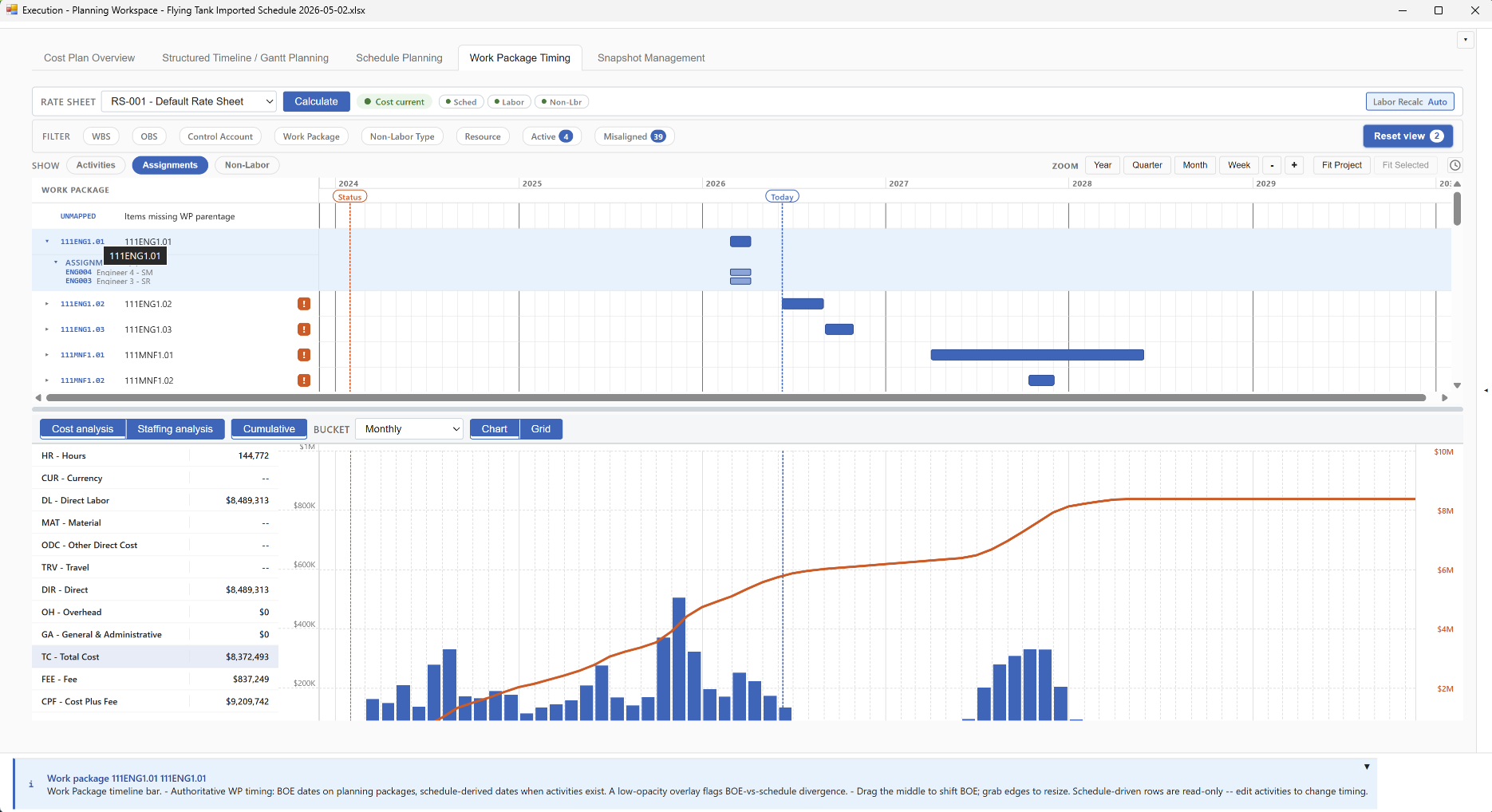
But once that question was on the table, finance came with it. If the system could support planned cost in a serious way, why should budget posture, funding context, actual-cost import, and EAC reconciliation still be scattered across separate tools and manual handoffs? That is where ProjectXL began turning into a real project-controls environment rather than a scheduling product with a few extra tabs.
Guided User Journeys
Then we ran into a different kind of problem. Even very capable tools can be frustrating if users have to reverse-engineer the workflow every time they sit down to work. We have all seen project-control environments that technically hold the right data but do very little to help the user understand what is ready, what is stale, what is blocked, and what should happen next.
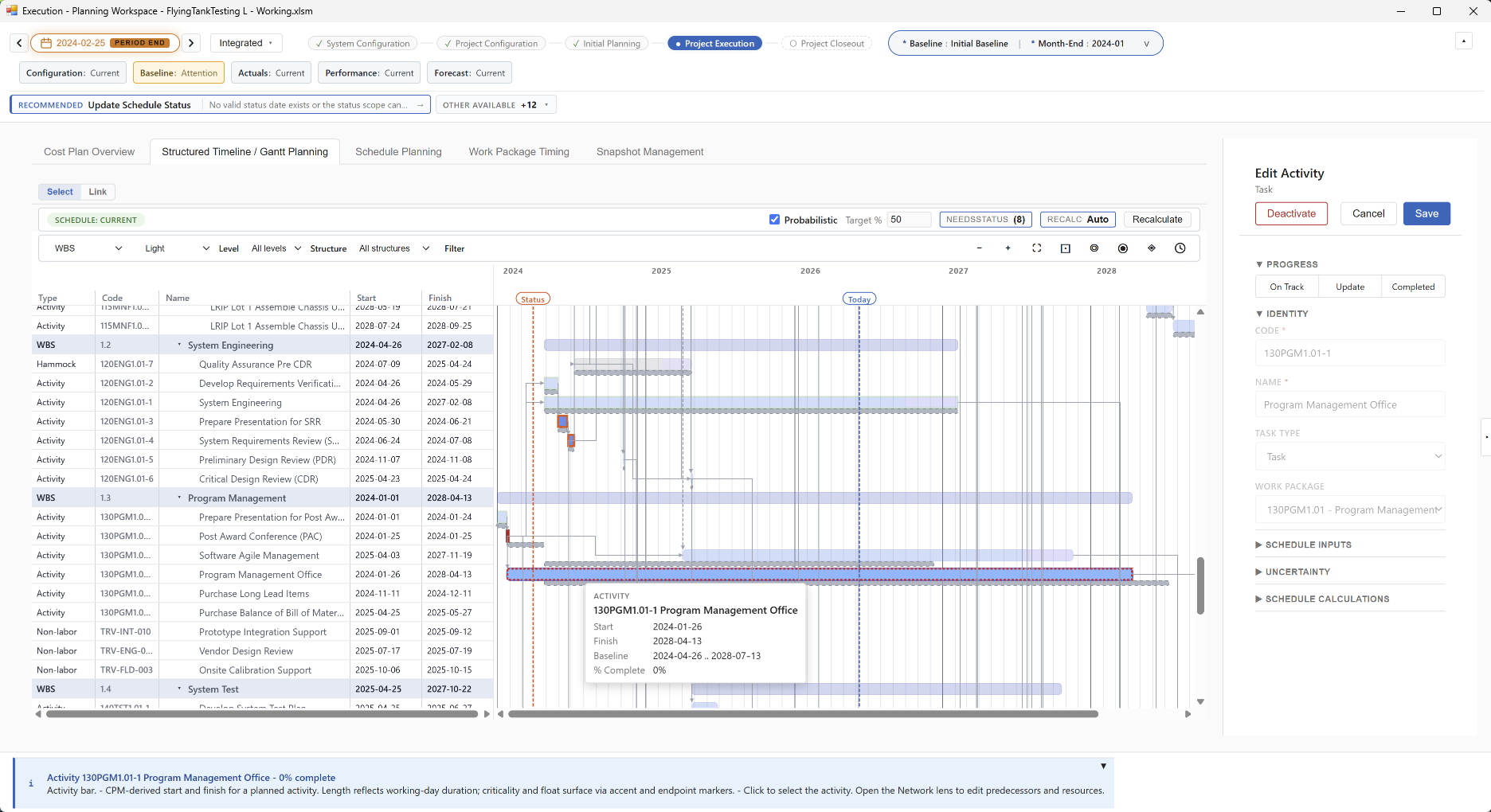
So the next question became: if we can govern the data, why not also guide the work? That led to the journey model, data-state indicators, stage-aware progression, action boards, workspace coaching, and the broader idea that the tool should help practitioners improve the quality of the project picture rather than merely expose raw fields and expect them to sort it out alone.
BI Optimization and Historical Analysis
Then came the historical picture. One of the enduring frustrations with legacy tools is how hard it is to reconstruct what changed, when it changed, and why. So we built governed snapshots, baseline designation, checkpoint comparison, and a way to treat history as a first-class part of the operating model instead of as a pile of copied files.
Once history was governed properly, the next question practically asked itself: if the system now knows how the plan has evolved, why should teams still struggle to get serious analytics out of it? That drove the snapshot comparison model, schedule-health analytics, BI export, and the ability to support deeper analysis and even schedule risk work from governed data rather than from side calculations and manual model translation.
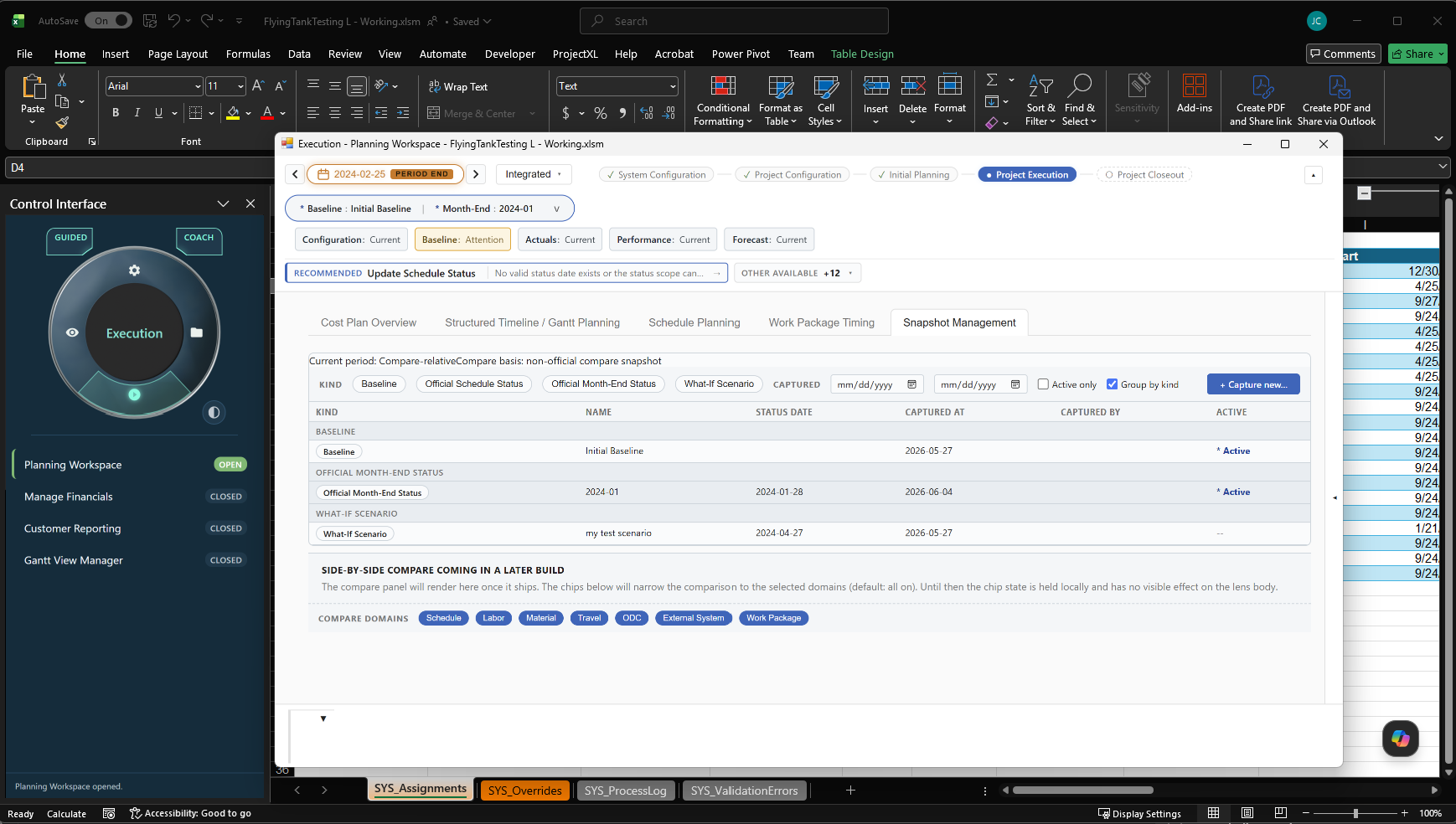
And because the governed data lives in native Excel tables, none of that had to mean giving up the analytical flexibility teams already depend on. Formulas, pivots, Power Query, and downstream BI tools remain available without first dragging data out of a black box and rebuilding it somewhere else.
AI Did Not Just Help Us Build Faster
As the product expanded, we also learned something important about AI itself. The models were powerful, but they were not magical. They were excellent at helping us identify good technical approaches, move faster across unfamiliar languages and libraries, and build capabilities we could not realistically have delivered on our own timetable.
But we also saw their limitations quickly. AI is most useful when it has enough context, clear boundaries, and a governed understanding of what it is looking at. In project controls, that matters even more because confident but weakly grounded answers are worse than no answer at all.
That lesson ended up shaping the product itself. We did not want an assistant that simply sounded smart. We wanted one that could reason from actual project state, named history, current workflow context, and explicit evidence. That is why ProjectXL's AI assistance is built as a context-aware advisory layer rather than as a generic chatbot pasted onto the side of the product.
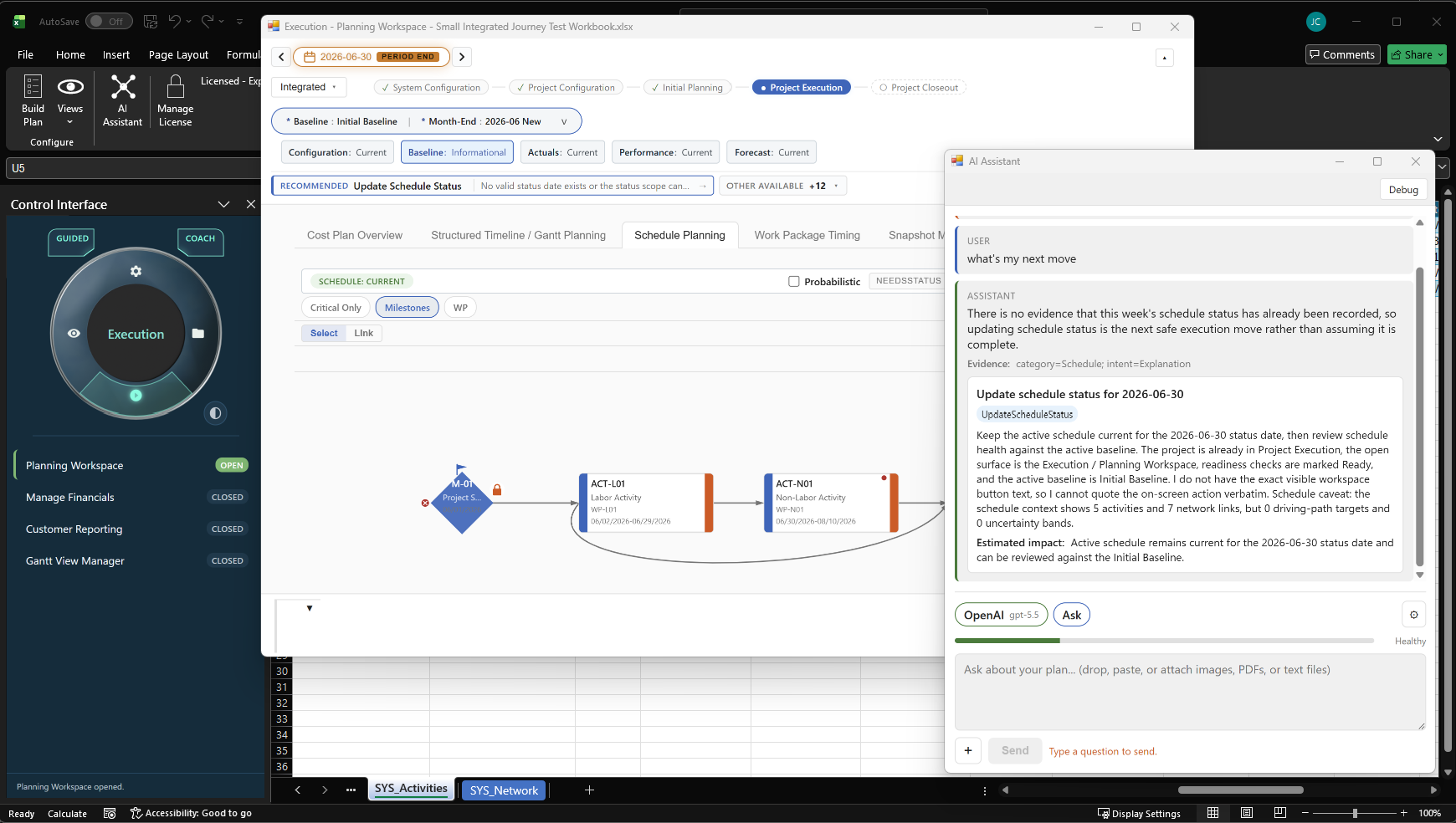
In other words, AI support became another capability group we chose to solve properly rather than superficially. We wanted grounded reasoning across historical plan states, time-anchor and evidence disclosure, lifecycle-aware guidance, and a strict advisory-only posture. The goal was not to let AI take over project control. The goal was to make AI genuinely useful inside a governed project-controls system.
Why This Became More Than a Replacement Tool
That is really the point of this whole story. We started by trying to solve one urgent problem: how to replace Project Online with something credible, affordable, and useful. But once we solved the first hard problem, it exposed the next one, and then the next one after that.
So this is not just a story about replacing a scheduling tool. It is a story about finally having the means to build the desktop project-controls environment we had wanted for years: one that keeps schedule planning, cost and finance, historical analysis, guided execution, BI optimization, and AI assistance moving in the same direction.
The end goal was never to ship a nicer Gantt chart. The end goal was a true desktop project control system that can answer the central question credibly: what is the best Estimate at Complete available right now? That means keeping the plan, the actuals, the forecast, the evidence, and the user guidance close enough together that the current project picture can be trusted and improved inside one governed environment.
Where the Product Stands Now
As of this writing, ProjectXL is planned for commercial release in September 2026. Feature finalization is happening in June, alpha testing is scheduled for July, and a limited public beta is planned for August.
That matters because ProjectXL is not being discussed here as a distant concept. The product is moving through finalization and test phases now, with the goal of reaching the market in time to offer organizations a credible path forward as the Project Online deadline approaches.
That is why the right move is not to search for the closest replica of the old environment. It is to use this moment to adopt something teams may ultimately be glad they were pushed to consider.